Installation Issues
BULK INSERT Permission Denied
SQL Server login does not have permission to run BULK INSERT.
Speediful writes staged data to SQL Server with BULK INSERT for performance, and every
operation that writes a large table (query, load, describe, metadata operations, and
more) can hit this if the permission is missing. SQL Server reports this internally as
error 4834, "You do not have permission to use the bulk load statement."
BULK INSERT needs the server-level ADMINISTER BULK OPERATIONS permission. You cannot
grant it to a database user; grant it to the SQL Server login Speediful connects as.
With SQL Server Authentication, that login is the SQL login in your Speediful server connection. You grant the permission once during installation (see Grant BULK INSERT Permission). You see this error again if you switch to a new login or someone revokes the grant.
With Windows Authentication (the default), that login is the SQL Server service account,
which SQL Server setup adds to the sysadmin server role. If you see this error with
Windows Authentication, the service account is not a member of sysadmin. Grant the
permission to the service account: NT SERVICE\MSSQLSERVER on a default instance, or
NT SERVICE\MSSQL$<instance name> on a named instance.
As a sysadmin, run:
USE master;
GO
GRANT ADMINISTER BULK OPERATIONS TO [your_login_name];
GO
Or add the login to the bulkadmin server role instead:
ALTER SERVER ROLE [bulkadmin] ADD MEMBER [your_login_name];
GO
Service Account Permissions
During installation:
WARNING: Setup could not give every SQL Server account access to Speediful's directories.
Or in the Results pane when you run a stored procedure:
WARNING: Speediful cannot write to C:\ProgramData\Speediful\SLAM\config\slam_endpoints.json (permission denied). Grant NT SERVICE\MSSQL$PROD, the account Speediful is running as, Modify permission on C:\ProgramData\Speediful\SLAM\config. See Service Account Permissions under Installation Issues in the Speediful documentation.
Earlier versions of the installer showed:
The installer failed to grant MSSQLSERVER permissions to the following directories...
The installer failed to grant SQLSERVERAGENT permissions to the following directories...
Speediful runs as the service account of the SQL Server instance that calls it. That account needs read and write access (Modify) to these directories:
- work directory (default
C:\Speediful_SLAM_work) - blob directory (default
C:\Speediful_SLAM_blob) - config directory (
C:\ProgramData\Speediful\SLAM\config), which holds global configuration - keys directory (
C:\ProgramData\Speediful\SLAM\keys), which holds the JWT private keys and certificates thatSLAM_setup_jwtgenerates for JWT Bearer authentication to Salesforce
The SQL Server Agent service account of the same instance needs the same access to run Speediful from SQL Server Agent jobs.
The installer asks which SQL Server instance will run Speediful, reads the accounts that instance's SQL Server and SQL Server Agent services run as, and grants those accounts Modify on the four directories. If it cannot read an account, or a grant fails, its warning lists the accounts it granted, the accounts and directories still missing access, and the query below.
Earlier versions of the installer granted access only to NT SERVICE\MSSQLSERVER and
NT SERVICE\SQLSERVERAGENT, the accounts of the default instance. On a named instance, on
SQL Server Express, or on an instance that runs under another account, those grants did not
reach the account SQL Server uses, even when the installer showed no warning. Install the
current version, or grant access by hand as described below.
Find the service accounts
Run this query in SQL Server Management Studio (SSMS), connected to the instance that runs
Speediful. It lists both accounts, and it works from any machine you connect from. It needs
the VIEW SERVER STATE permission.
SELECT servicename, service_account FROM sys.dm_server_services;
For a named instance called PROD, the result looks like this:
| servicename | service_account |
|---|---|
SQL Server (PROD) | NT Service\MSSQL$PROD |
SQL Server Agent (PROD) | NT Service\SQLAgent$PROD |
Unless an administrator changed them, the accounts follow the instance name:
| Instance | SQL Server account | SQL Server Agent account |
|---|---|---|
Default instance (MSSQLSERVER) | NT SERVICE\MSSQLSERVER | NT SERVICE\SQLSERVERAGENT |
Named instance, for example PROD | NT SERVICE\MSSQL$PROD | NT SERVICE\SQLAgent$PROD |
SQL Server Express (named instance SQLEXPRESS by default) | NT SERVICE\MSSQL$SQLEXPRESS | None. Express has no SQL Server Agent |
An instance can also run under a domain account, NETWORK SERVICE or LocalSystem. The
query shows whichever account is in use.
You can also read the accounts from Windows Services on the SQL Server machine:
-
Go to Control Panel and open "View local Services" (or run
services.mscfrom the Run dialog) -
Find the SQL Server entry for your instance, right-click it and open Properties
-
Go to the Log On tab and note the account
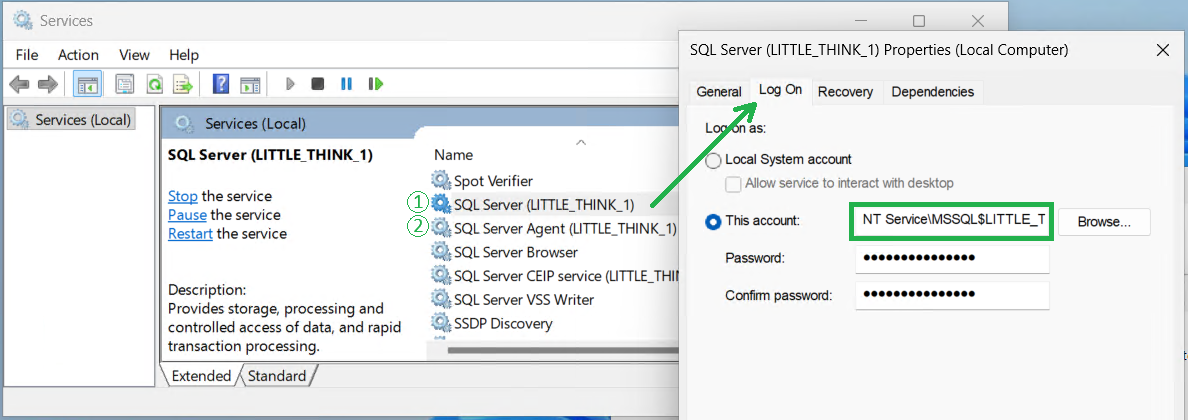
-
Repeat for the SQL Server Agent entry of the same instance
Grant the permissions
From an administrator command prompt, run this once for each account and each directory, replacing the directory and the account:
icacls "C:\ProgramData\Speediful\SLAM\config" /grant "NT SERVICE\MSSQL$PROD:(OI)(CI)M" /T
Or use File Explorer:
- Right-click the directory and open Properties
- Go to the Security tab and click Edit, then Add
- Make sure From this location is the local computer, enter the account name and click OK
- Check Modify under Allow and click OK
- Repeat for the other account and the other directories
C:\ProgramData is a hidden folder. You may need to change your File Explorer settings to
see it.
SQL Server Express
WARNING: SQL Server Express is not a supported edition of SQL Server for Speediful.
The installer shows this warning when you select a SQL Server Express instance, then
continues and grants that instance's SQL Server account access. Express installs as the
named instance SQLEXPRESS by default, so its account is NT SERVICE\MSSQL$SQLEXPRESS.
Express has no SQL Server Agent, so the installer grants no Agent account and Speediful
cannot run from SQL Server Agent jobs on it.